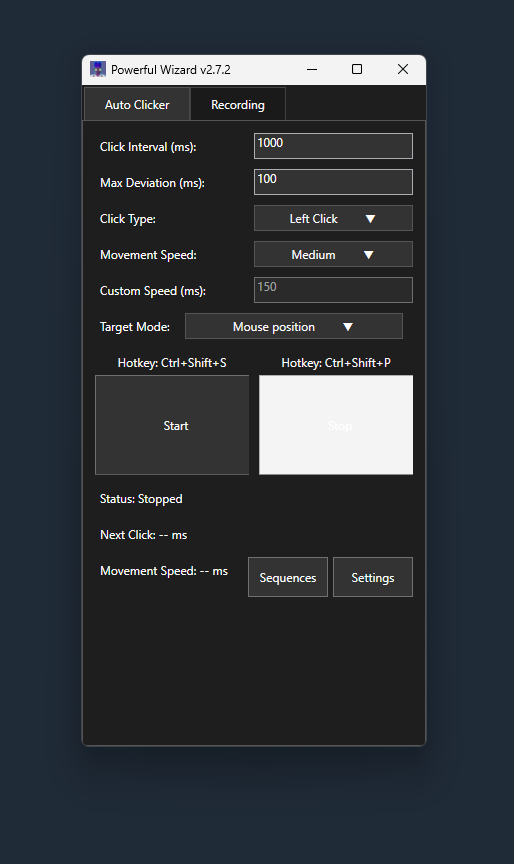
PowerfulWizard is a powerful, free alternative to Ghost Mouse that specializes in mouse recording and playback. Unlike basic autoclickers, PowerfulWizard lets you record complex mouse movements, clicks, and sequences, then replay them automatically with customizable timing and randomization. This makes it perfect for automating repetitive tasks that require more than just simple clicking.
PowerfulWizard's mouse recording feature captures every mouse movement, click, and action you perform. Simply click "Start Recording" and perform your desired sequence of actions - whether it's navigating through menus, clicking specific buttons, or performing complex multi-step operations. The software records the exact timing, positions, and types of clicks. When you're done, click "Stop Recording" and save your sequence for future playback.
Recorded sequences can be replayed with customizable settings: adjust playback speed, add random delays between actions to mimic human behavior, loop sequences indefinitely, or trigger them with custom hotkeys. This is perfect for automating repetitive tasks like form filling, game grinding, data entry, or any workflow that requires consistent mouse movements and clicks. You can also edit recorded sequences to fine-tune timing or remove unnecessary actions.
Yes, PowerfulWizard is safe to use. It's open-source software available on GitHub, allowing community review of the code for security. It doesn't contain malware, spyware, or unwanted advertisements. The program only performs the actions you configure and doesn't collect personal data. However, always use automation tools responsibly and in accordance with the terms of service of the applications you're automating.
Getting started with mouse recording is simple: download PowerfulWizard, launch the program, and click the "Record" button. Perform your desired sequence of mouse movements and clicks, then click "Stop Recording" when finished. You can save your recording with a descriptive name and replay it anytime. The interface shows your recorded sequences and allows you to edit timing, add randomization, or set up hotkeys for easy playback. Start with simple sequences and gradually build more complex automations.