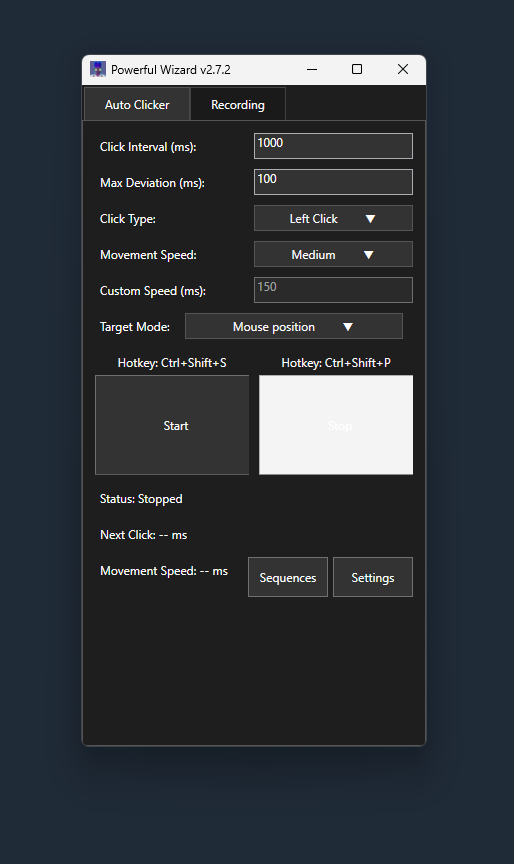
Use intervals around 3000 ms to align with spell cooldowns and avoid bot detection.
Test setup with a small stack to ensure clicks align with spell and item.
Using autoclickers risks account bans; use cautiously and consider manual alching for safety.
Sequence crash fix: Opening the Sequence Configurator no longer crashes when run-time controls load.
Run time limit (v2.7.3+): Optional auto-stop after a set time, great for capping alching sessions, with a live countdown in the main stats area.
Multi-monitor & DPI fix (v2.7.2+): Clicks land inside the drawn click area; trail covers all monitors.
Download PowerfulWizard from a trusted source and launch it. Select the High Level Alchemy spell icon in your OSRS spellbook as the click target, then position a stack of noted items (like yew longbows or rune items) nearby in your inventory. Set click intervals to 3000-3100 ms (to match the 3-second spell cooldown) with random variations for human-like behavior, and assign hotkeys (like F7 to start, F8 to pause). In-game, click the spell, then the item stack, hit the start hotkey to automate, and stop manually to avoid bot detection.
PowerfulWizard automates High Level Alchemy in OSRS, letting you convert items (like magic longbows or rune armor) into coins while training Magic, without repetitive manual clicking. Random intervals (like varying 3000-3100 ms) mimic human timing to reduce bot detection risks, and hotkeys simplify control. It's great for AFK alching during other tasks or grinding Magic XP (up to 78,000 per hour), but overuse may flag your account, as automation violates Jagex's rules.
PowerfulWizard is entirely free, no fees or premium versions. Download it from a reputable source to avoid malware, and use it for high alching in OSRS with items like air battlestaves or dragonhide armor, keeping your setup safe and cost-free.